Integrating Secure Google Calendar & Meet Bookings in Next.js
How to connect Google Calendar & Meet APIs with Next.js App Router and Server Actions to automate client strategy sessions and discovery calls.


Integrating Google Calendar & Meet in Next.js
Automating booking processes reduces administrative overhead and makes it easy for potential clients or recruiters to get in touch. Let's break down how to implement a secure booking flow using Next.js Server Actions and the Google APIs.
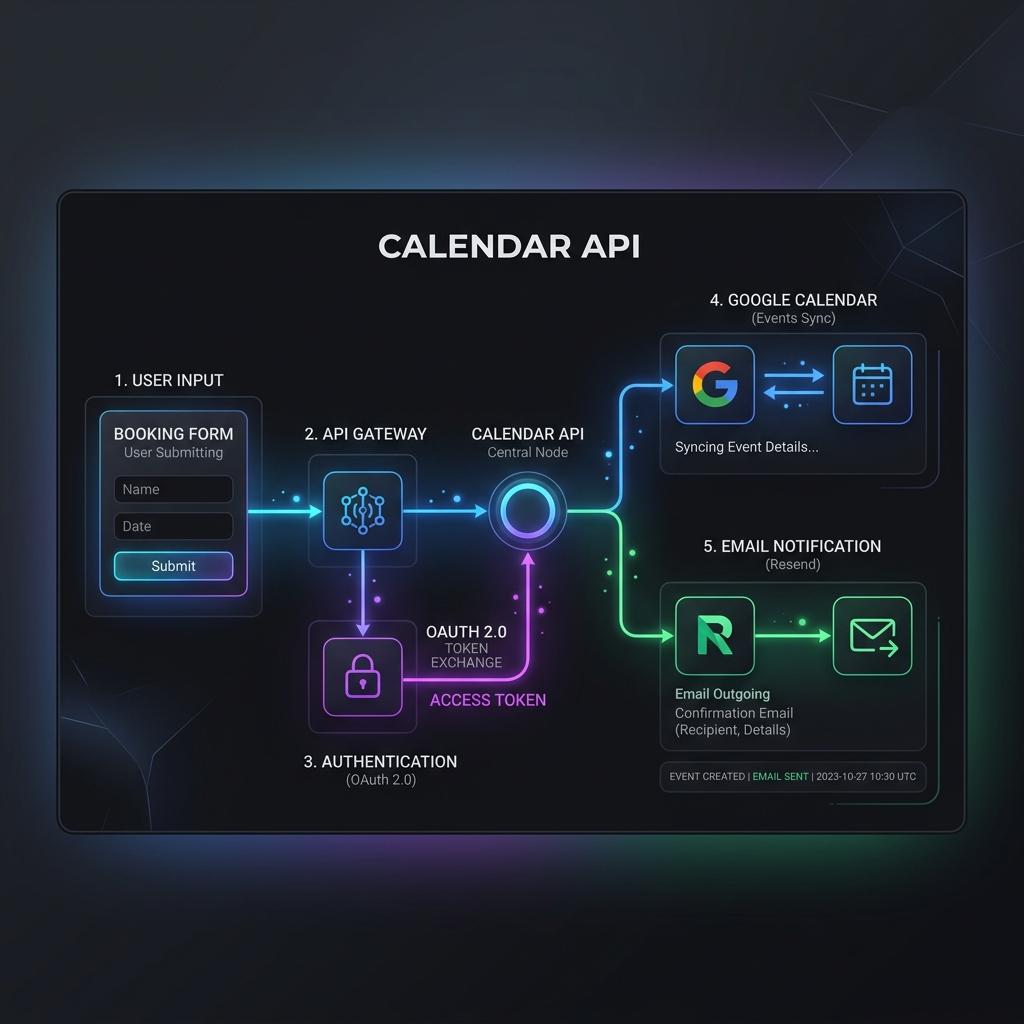
The Workflow Architecture
When a user selects an available date and time slot, the following sequence occurs:
1. Form Submission: The user enters their details and submits the React client form.
2. Server Action Execution: The backend securely connects to the Google API using environment credentials.
3. Calendar Event Creation: An event is generated on your Google Calendar, with dynamic Google Meet video conference links attached.
4. Notifications: Automated calendar invites (.ics) are sent to the client, and confirmation emails are dispatched using Resend.
1. Setting up Google OAuth & API Client
Store your OAuth Credentials safely in your .env file. Next, instantiate the client inside a secure server file.
class=class="text-emerald-500 dark:text-emerald-400 font-medium">"text-slate-500 italic">// lib/google-auth.ts
import { google } from 'googleapis';

const oauth2Client = new google.auth.OAuth2(
  process.env.GOOGLE_CLIENT_ID,
  process.env.GOOGLE_CLIENT_SECRET,
  process.env.GOOGLE_REDIRECT_URI
);

class=class="text-emerald-500 dark:text-emerald-400 font-medium">"text-slate-500 italic">// Set tokens dynamically from database or token store
oauth2Client.setCredentials({
  refresh_token: process.env.GOOGLE_REFRESH_TOKEN,
});

export const calendar = google.calendar({ version: 'v3', auth: oauth2Client });
2. Generating the Meeting dynamically
When inserting an event, you can request Google to automatically generate a unique Google Meet link using conferenceDataVersion: 1.
class=class="text-emerald-500 dark:text-emerald-400 font-medium">"text-slate-500 italic">// app/actions/createMeeting.ts
'use server';

import { calendar } from '@/lib/google-auth';

export async function createMeeting(clientData: { name: string; email: string; dateTime: string }) {
  try {
    const event = {
      summary: class="text-emerald-500 dark:text-emerald-400 font-medium">`Strategy Session with ${clientData.name}`,
      description: 'Discussing project requirements and scope.',
      start: {
        dateTime: clientData.dateTime,
        timeZone: 'UTC',
      },
      end: {
        dateTime: new Date(new Date(clientData.dateTime).getTime() + 30 * 60 * 1000).toISOString(), class=class="text-emerald-500 dark:text-emerald-400 font-medium">"text-slate-500 italic">// +30 mins
        timeZone: 'UTC',
      },
      attendees: [
        { email: clientData.email },
        { email: 'your-email@example.com' } class=class="text-emerald-500 dark:text-emerald-400 font-medium">"text-slate-500 italic">// Host email
      ],
      conferenceData: {
        createRequest: {
          requestId: class="text-emerald-500 dark:text-emerald-400 font-medium">`meet-${Date.now()}`,
          conferenceSolutionKey: {
            type: 'hangoutsMeet',
          },
        },
      },
    };

    const response = await calendar.events.insert({
      calendarId: 'primary',
      requestBody: event,
      conferenceDataVersion: 1, class=class="text-emerald-500 dark:text-emerald-400 font-medium">"text-slate-500 italic">// Crucial for Google Meet URL generation
    });

    return {
      success: true,
      meetUrl: response.data.conferenceData?.entryPoints?.[0]?.uri || null,
    };
  } catch (error) {
    console.error('Failed to create calendar event:', error);
    return { success: false, error: 'Booking failed' };
  }
}
3. Best Practices for Reliability
- Token Refreshing: Always listen for token refresh events and update your persistent store.
- Timezone Verification: Ensure all selected times are converted to ISO strings with explicit offsets.
- Fallback Scheduling: If the API request fails, provide a fallback link to static booking software or a direct contact form to prevent user frustration.